value_counts() : Series에서 unique한 value들이 몇 개씩 분포하고 있는지 나타내준다
sort_index() : value_counts()를 index 순서대로 나열해준다 (오름차순)
from sklearn.datasets import fetch_20newsgroups
import pandas as pd
data = fetch_20newsgroups(subset = 'all', random_state = 123)
print('sort index 전 target 값과 분포도 확인 \n', pd.Series(data.target).value_counts())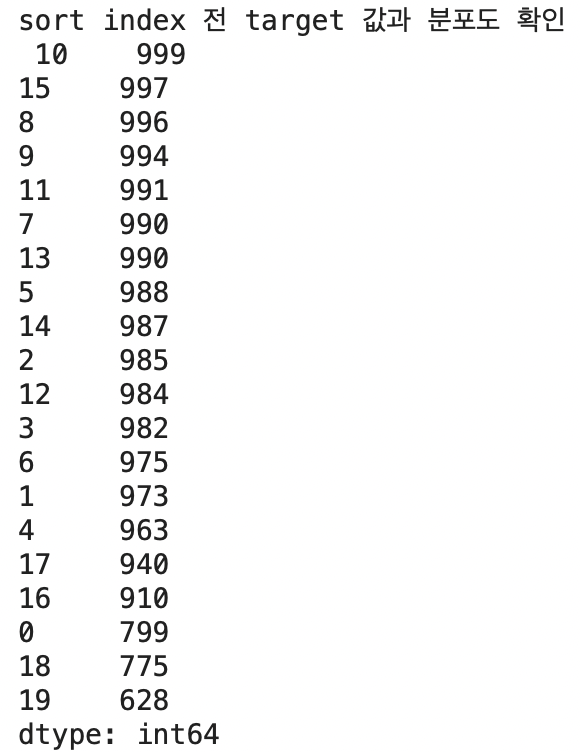
print('sort index 후 target 값과 분포도 확인 \n', pd.Series(data.target).value_counts().sort_index())
value의 분포가 동일하면 sort_index()를 하기 전후 결과값이 같을 수 있다
from sklearn.datasets import load_iris
import pandas as pd
iris = load_iris()

print('sort index 전 target 값과 분포도 확인 \n', pd.DataFrame(iris.target).value_counts())
print('sort index 후 target 값과 분포도 확인 \n', pd.DataFrame(iris.target).value_counts().sort_index())
'What I study > Python_details' 카테고리의 다른 글
| [Python Pandas] reshape을 자세히 알아보자(melt와 pivot) (0) | 2022.12.16 |
|---|---|
| [Python] 코랩에 데이터(ex. csv 파일 등) 불러오기 (두 가지 방법) (0) | 2022.12.12 |
| [Python Numpy] np.concatenate()와 np.column_stack()의 차이점 (1) | 2022.12.06 |
| [Python Pandas] pandas 주요 명령어 모음집 (0) | 2022.12.02 |
| [Python] ModuleNotFoundError: No module named 'graphviz' 오류 해결하기 (0) | 2022.11.01 |